
Is Your Laptop Bag Size Really Right for Your Laptop?
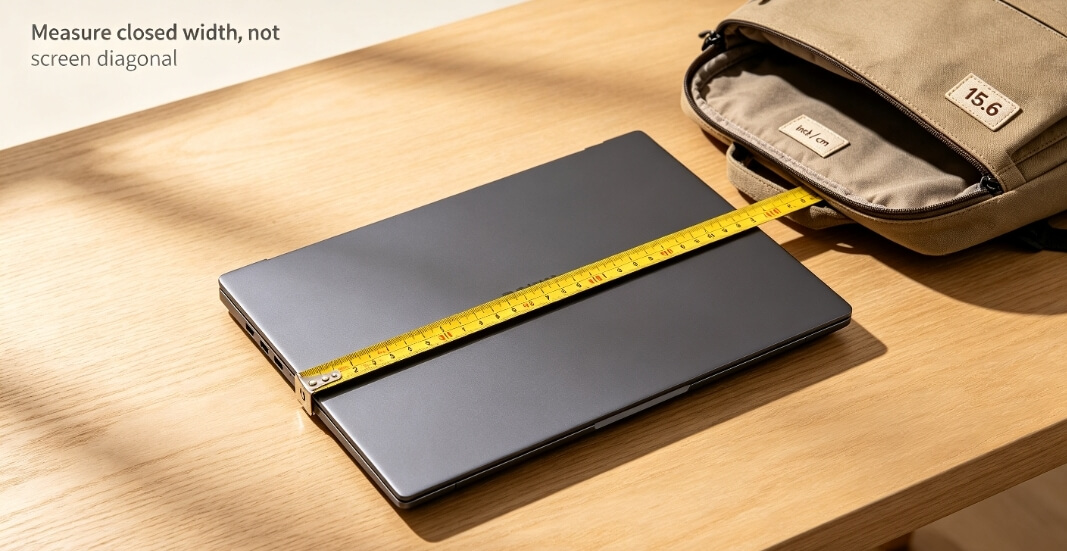
A laptop bag size label that says ‘15.6 inches’ does not necessarily mean your 15.6-inch laptop will fit. Close the lid and measure your laptop’s width, depth, and thickness, then compare those measurements with the bag’s usable compartment space. That is the only reliable way to choose the right bag.
A laptop size measurement based only on screen diagonal is not enough. The diagonal is mainly used by manufacturers to label screen size. The laptop body is shorter than the diagonal, and the bezels take up additional space.
Laptop Size Measurement
Close the laptop and place it flat on a table.
- Run a tape measure from the left edge to the right edge to get the width.
- Measure from the front edge, where your palms rest, to the back edge near the hinges to get the depth.
- Measure from the tabletop to the highest point of the lid to get the thickness.
Do not measure the laptop with the lid open. An open-lid measurement reflects how you use the laptop, not how it sits inside a bag.
For example, the Dell XPS 15 9520 is officially listed at 344.4 mm wide, 230.14 mm deep, with a front height of 18.54 mm. If you use a hard shell, add those extra few millimeters on each side and repeat the measurement with the case on.
Dimensions of a Laptop Bag
If a product page says the dimensions of a laptop bag are ‘38 × 27 × 3 cm’ internally, do not take that number at face value.
The padding can reduce the usable space around the edges. The zipper teeth take up some room, and rounded bottom corners can reduce it further. The stated internal dimensions are usually measured from one fabric edge to another, so the actual usable clearance can be smaller.
Before buying, ask the seller one simple question: ‘What is the usable clearance inside the laptop compartment?’ If they cannot provide it, assume the actual clearance is smaller than the listed internal dimensions.
A Chinese industry group standard, the Design Guide for Convertible Computer Bags, has recommended adding 10–30 mm to the laptop length, 10–20 mm to its height, and 0–10 mm to its thickness when determining the bag’s internal space. Too little allowance makes the laptop difficult to insert and remove; too much allows it to move around inside the compartment.
If the laptop has a case, use the cased dimensions when calculating the clearance. Do not measure the bare laptop once and place the order.
Laptop Bag Size and Compartment Orientation
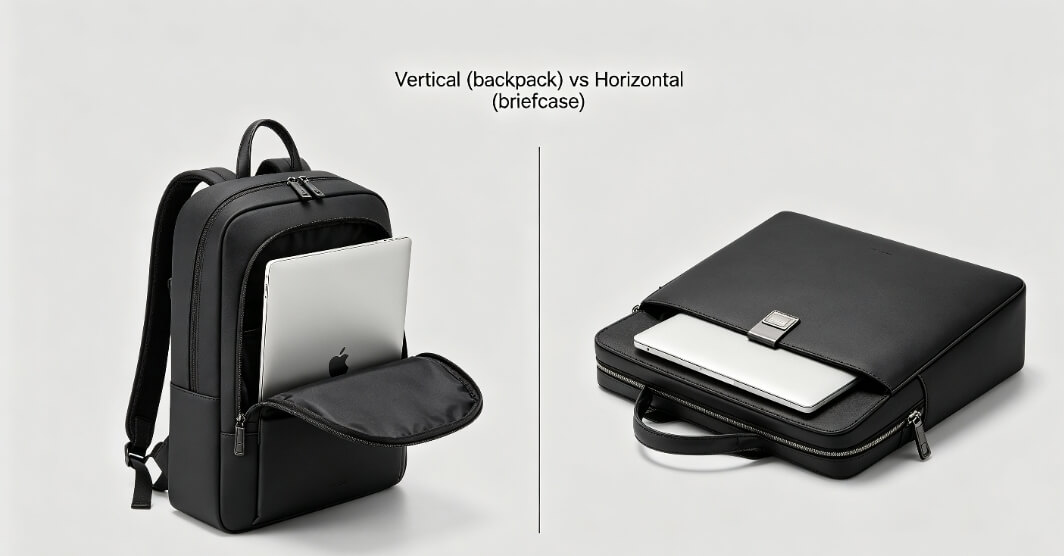
Backpack laptop compartments usually run vertically, so the laptop goes in upright. Briefcases, tote-style work bags, and messenger bags often have horizontally oriented compartments, so the laptop goes in sideways.
That means the same laptop can have different amounts of clearance depending on the compartment orientation. The width and depth are effectively swapped, which changes both the fit and the feel when you take the laptop in and out.
The compartment opening matters, too.
A fully opening clamshell bag lets you lay the bag flat before inserting the laptop. A top-loading compartment may have an opening that is narrower than the compartment itself. Your laptop might fit inside the compartment but still be too wide to get through the zipper opening.
For a side-opening briefcase, check the length of the side zipper rather than looking only at the compartment length.
Why ‘15.6 Inches’ Is Not Enough
Two laptops can both be marketed as 15.6-inch models while having noticeably different body widths.
The XPS 15, for example, is 344.4 mm wide. A 15.6-inch model from another brand may have a different body width.
So when choosing a bag, compare the actual measurements in millimeters instead of guessing from the words ‘15.6 inches.’ The same principle applies to laptop bag size labels and the listed dimensions of a laptop bag.
Before ordering, you can even cut a piece of cardboard to the exact ‘width × depth’ of your laptop with its case on. Slide it into the compartment and check whether it goes in smoothly, clears the corners, and allows the zipper to close without tension.
If it does, you have a good fit. If it does not, choose another bag. Do not rely solely on a claim that says ‘fits 15.6-inch laptops.’
Custom Laptop Bags for Bulk Orders
If you are not buying just one bag but need a branded batch of laptop bags for a team, client, or retail store, the process is different. Once you have measured the laptop, you need to work backward from those measurements to determine the required compartment clearance.
In that situation, working directly with a manufacturer can be more practical than going through a retailer. Dongguan-based XINHUI (昕辉) has more than 20 years of experience in luggage and bag manufacturing, with laptop bags, tote bags, and makeup bags among its products.
Their approach is straightforward: provide the actual laptop width, depth, and thickness, including the case if one will be used. The designer then works backward from the applicable allowance standard to determine the compartment clearance. The opening direction, padding thickness, and rounded bottom corners are finalized during sampling before production begins.
They offer low minimum order quantities, while common materials such as polyester, nylon, PU, and canvas, along with webbing and hardware, can be sourced through the factory. This avoids having to coordinate separately with fabric suppliers, printers, and inspection companies.
Their stated quality-control process includes pre-shipment sampling inspections and full inspection of finished products, and the company says its repeat-customer rate is around 98%.
Put simply, retail bag measurements are mainly about avoiding a bad fit. Custom bag measurements are about achieving a precise fit.
XINHUI has produced a range of designs that show how dimensions of a laptop bag can be adapted to real-world use.
1. Minimalist Business Briefcase: Fixing Corner Conflicts at the Sample Stage

Many 15.6- or 16-inch business laptops, including models such as ThinkPads and MacBook Pros, have relatively squared-off edges. They can catch on the bottom corners of a bag designed with overly rounded corners.
For its XH-D094 reference model, XINHUI adjusts the inner corners of the laptop compartment during sampling to accommodate those sharper laptop edges. The bag uses a durable nylon fabric specified by the customer, along with a padded shoulder strap and a rear luggage sleeve.
Inside, the multi-compartment layout includes a dedicated laptop divider. The divider thickness can be adjusted according to the provided laptop size measurement data, helping keep documents from pressing against the laptop screen.
As a manufacturer with more than 20 years of experience, XINHUI supports orders starting from 300 pieces, with customization available for materials, dimensions, colors, and even leather trim. For businesses that need professional commuter bags tailored to specific laptop models, the structural design approach is worth studying.
2. Elegant Women's Laptop Bag: Making Better Use of Limited Space

A 15.6-inch laptop may be only one of the things a commuter needs to carry. A typical workday might also require space for a tablet, makeup pouch, and documents.
That calls for a compact exterior with an efficient interior layout. The XH092002 reference model measures approximately 30 × 39 × 13 cm and uses water-resistant fabric with gold-tone double zippers.
During the laptop size measurement process, XINHUI’s designers reserve a dedicated laptop compartment while planning eight pockets and two pen slots around it. So even though the external dimensions of a laptop bag remain compact and elegant, the interior can still hold everyday essentials in an organized way.
The adjustable, widened shoulder strap and top handles are designed to improve comfort during commuting without making the bag unnecessarily bulky.
FAQ
Q1: Why does a bag labeled ‘fits 15.6 inch’ still not fit my 15.6-inch laptop?
‘Fits 15.6 inch’ refers to a screen diagonal of about 39.6 cm, not the laptop’s actual body width.
The body is generally shorter than the diagonal, while the usable compartment clearance can be smaller than the stated internal dimensions because of padding, zippers, and rounded corners.
Close the laptop, measure its actual width, depth, and thickness, and measure it again with the case on. Then compare those numbers with the bag’s usable compartment clearance rather than its advertised screen-size compatibility.
Q2: If my laptop has a hard case, should I still calculate the allowance using the bare laptop dimensions?
No. Use the cased measurements.
Repeat the laptop size measurement with the case installed, then apply the recommended clearance: add 10–30 mm to the length, 10–20 mm to the height, and 0–10 mm to the thickness.
A hard case can add several millimeters on each side. A bag that fits the bare laptop perfectly may leave no room for the cased laptop.
Q3: Can I use a backpack and a briefcase interchangeably if both say ‘15.6-inch laptop compartment’?
Not necessarily.
A backpack compartment usually runs vertically, with the laptop inserted upright. A briefcase compartment often runs horizontally, with the laptop inserted sideways.
The laptop’s width and depth therefore occupy different directions in the two compartments, so the available clearance is distributed differently.
A vertical compartment may leave more room above and below the laptop, while a horizontal compartment may leave more room on the sides. The laptop bag size label alone does not tell you how that clearance is distributed.
Choose based on how you normally carry the bag, and check the actual dimensions of a laptop bag and compartment opening before buying.
How to Choose the Right A4-Compatible Bag
Organza Bags Guide for Everyday Use
Related Article


